A short animated loop gives a digital painter something a still image cannot: immediate feedback about how shapes change over time. Krita supports frame-by-frame raster animation, so you can draw the poses yourself with familiar painting tools. The best first project is small enough that you can revise its movement without facing hundreds of unfinished drawings.
Set up for a rough pass
Krita's official guide recommends switching to the Animation workspace and planning longer work as shorter clips. It also warns that animation consumes working memory. A modest canvas and a short duration make a useful starting point; the guide suggests 800 × 450 pixels for sketching and 12 frames per second for beginners. Keep a static background separate from the animated drawing. Follow the official animation introduction.
Understand what the timeline is holding
The Timeline manual distinguishes a blank keyframe, a duplicate and a clone. A duplicate is an independent copy you can redraw. A clone shares image data with its source, so editing one affects its clones. Krita holds each keyframe until the next one on that layer; you do not need to redraw every time slot just to keep an image visible. Check the active keyframe before painting, because a selection of timeline cells is not the same thing as the drawing you are editing. See the Timeline reference.
For a first loop, those distinctions matter more than memorizing every shortcut. A pose held for longer can feel deliberate, hesitant or heavy. Putting a new drawing into every slot may create more work without improving the action.
Use onion skins to compare drawings
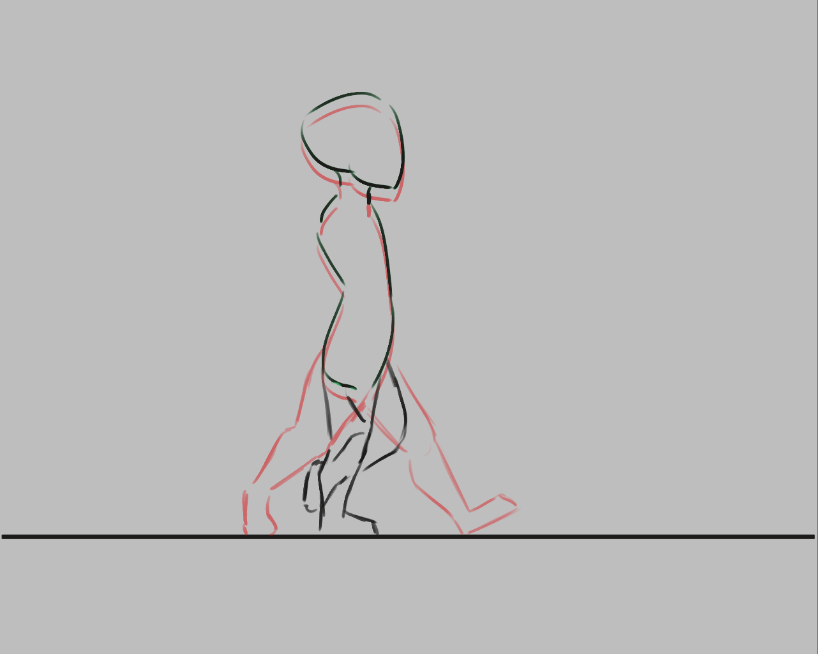
The Onion Skin docker lets you control which neighboring frames appear, their opacity and their tint. Use those overlays to compare a few nearby poses. The animation guide also notes that white paint is opaque: areas around the drawing should be transparent if you want the underlying onion skins to remain useful. Read the Onion Skin reference.
Try a two-second head turn
Editorial exercise: draw a simple character noticing a sound, turning its head and returning to its original pose. Start with the three important drawings only. Avoid detailed hair or a patterned costume; keep the features large enough to compare.
Play the rough sequence and adjust the holds until the reaction is understandable. Then add a breakdown between the front and side views. Track the nose, chin and eye line as landmarks. If the head seems to shrink, revise its construction before adding more in-betweens.
Finally, compare the last drawing with the first. A loop that jumps at the join usually needs attention to pose or timing. Save a separate rough version before cleanup so you can return to the stronger gesture if polishing stiffens it. Aim to finish a readable movement you can study, rather than a long sequence you cannot yet control.
The manual illustration above is reproduced unchanged. Read its GNU Free Documentation License.